
Designrr Review 2026: Is This Ebook Creator Software Worth It?

Designrr Review: The Ultimate Ebook Creator Software

Welcome to this comprehensive review designed to help every digital marketer make an informed decision about the leading ebook creator software available on the market today. If you want to streamline your online business, understanding how this platform functions is essential for success.
Overview of Designrr

What is Designrr
Designrr is a powerful ebook creator software and digital publishing platform built to help users quickly transform raw content into professional lead magnets and digital products without needing advanced technical skills or expensive design agencies.
You can turn a handful of your ideas into a polished eBook faster than you think — without hiring a designer or spending days formatting.
First impressions
When you open Designrr for the first time, it feels like stepping into a tidy writing studio that’s already laid out the supplies for you. The interface is quiet where it needs to be, colorful where it helps, and surprisingly permissive. You won’t be distracted by unnecessary features; instead, you’re guided through four practical steps that get your idea onto the page and into a finished file.
That ease is part of the product’s charm. It doesn’t try to be everything to everyone; it strips away friction so you can work. If you favor craft over chaos, you’ll appreciate how Designrr scaffolds the project without imposing a voice or a rigid template of how you should write.
First-run setup
- You sign in.
- You choose whether to start from scratch, import content, or have WordGenie™ generate a draft for you.
- You pick a template and begin customizing.
Within minutes you have a draft or a formatted file. That immediacy is the core selling point: fast work that looks like slow, careful work.
How Designrr works — the four-step flow
Designrr organizes the process into four clear steps, which makes it easy to follow and to teach:
- Share ideas or import content — use WordGenie™ to generate an outline and first draft or import existing material.
- Pick a template — hundreds of niche-ready layouts optimized for readability and conversions.
- Customize — tweak fonts, colors, images and layout with an easy visual editor.
- Publish & share — deliver a polished PDF, flipbook, Kindle file or embed on your site in one click.
This linear flow matters because it respects the order you actually work in: idea, structure, look, delivery.
WordGenie™: the built-in AI writing assistant
WordGenie™ is the engine that will write a first draft in your voice from a few answers. You tell it the subject, the tone, the audience, and a few bullet points, and it generates an outline and content. This is where the product feels most contemporary: built on the same kinds of models as other advanced AIs, but packaged to produce long-form, formatted content quickly.
What this means for you:
- You can bypass the blank page.
- You get draft sections that already feel like chapters.
- You can edit and shape voice and nuance rather than invent structure from scratch.
It’s not perfect — AI will sometimes make odd phrasing choices or assume facts you didn’t intend. But you retain full control, and the time you save on structure and length is significant.
Realistic expectations for AI output
- WordGenie™ is best for generating first drafts, outlines, chapter frameworks, and lead-magnet content.
- You should plan to edit for accuracy, nuance, and voice.
- Use it for brainstorming titles, subheads, summaries, and bullet lists too.
Templates and design tools
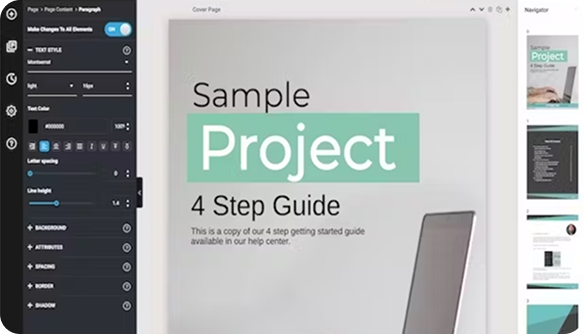
You get access to 100+ professionally designed templates. These aren’t generic page-fillers; they’re optimized for readability, email capture, and conversion. Templates come in a range of styles — modern, minimalist, corporate, creative — and are responsive when exported to certain formats.
The visual editor is drag-and-drop simple. You can:
- Swap images, edit them with a built-in editor, and choose from millions of royalty-free images.
- Adjust fonts, colors, and spacing without CSS knowledge.
- Add automatic table of contents, page numbering, and clickable links.
If you’re protective of a brand aesthetic, you can lock in fonts and colors quickly. If you prefer to improvise, you can move blocks around with confidence.
This image is property of cdn.convertri.com.

Using Designrr with WordPress

Integrating Designrr into Your WordPress Site
When you use Designrr alongside your online business website, you can easily embed your newly generated ebooks and flipbooks directly into your WordPress pages. This integration allows any marketer to showcase digital products smoothly, ensuring visitors can download valuable resources without ever leaving your platform.
Publishing Ebooks on WordPress Using Designrr
Publishing your finished manuscript as a lead magnet on WordPress becomes a streamlined process when you leverage this ebook creator software. After you create an ebook, you can export the EPUB file or PDF file directly, upload it to your media library, and provide an easy download link for your audience to subscribe.
Benefits of Using Designrr with WordPress
Combining the power of Designrr with WordPress offers numerous advantages for digital marketers looking to grow their subscriber list. By transforming a simple Word document or blog post into stunning e-books complete with a table of contents, you enhance user engagement and deliver professional content within your specific niche.
Video Details and Tutorials

Video Tutorials for Beginners
Watching a detailed video tutorial helps every beginner understand how to navigate the Designrr interface and use Designrr effectively from day one. These step-by-step guides walk you through how to choose a template, edit text, and export your digital products into standard formats like PDF without any technical frustration.
Advanced Techniques in Designrr
Mastering advanced techniques in this ebook creator software allows you to utilize artificial intelligence for generating a new chapter, summarizing a transcript, or integrating external assets like Canva. These powerful features empower any creator to produce highly polished digital publications that stand out in 2026.
Customer Testimonials and Case Studies
Reviewing authentic customer testimonials and case studies reveals overwhelmingly positive experiences from real people who rely on Designrr for their digital publishing needs. Verified user feedback consistently highlights how the platform simplifies ebook creation, boosts online business growth, and provides exceptional customer support for marketers worldwide.
Importing and content cleaning
Designrr really shines at import. It accepts content from Word, Google Docs, PDFs, blog posts, and web pages. The import tool cleans up formatting, removes messy HTML, and converts headings to an organized structure you can edit.
Why this matters:
- You can recycle blog posts into lead magnets in minutes.
- Old drafts and PDFs become editable content.
- The cleaning tool saves you hours of manual formatting.
Publishing and export options
Designrr lets you export to:
- PDF (print-ready or optimized for digital lead magnets)
- Kindle file (.mobi/.kpf depending on updates)
- Interactive flipbook (clickable, protectable from downloads)
- Embed code for web pages
That set of outputs covers most of what you’ll need whether you’re selling direct, distributing on Kindle, embedding on a sales page, or sharing a downloadable lead magnet.
Quick-reference feature table
| Feature | What it does for you | Why it matters |
|---|---|---|
| WordGenie™ AI drafts | Generates outlines and draft chapters from prompts | Saves time and gets you past the blank page |
| Templates (100+) | Pre-designed layouts for multiple niches | Professional look without hiring a designer |
| Import (Docs, PDFs, blogs) | Cleans and converts content into editable format | Recycles existing material quickly |
| Visual editor (drag-and-drop) | Customize pages, fonts, colors, images | No design skills required |
| Built-in image editor | Crop, adjust, add overlays | Saves switching apps for minor edits |
| Table of contents & page numbers | Automatic generation | Keeps long documents navigable |
| Export options | PDF, Kindle, flipbook, embed | Publish anywhere you need |
| Royalty-free images | Millions included | Easy to find visuals without licensing worry |
| Clickable, protected flipbooks | Interactive distribution with download protection | Protects content and creates a better reader experience |
| Republish anytime | Update and export again | Keeps your product current |
A sample workflow — from idea to published file
You have a kernel of an idea: a 7-step approach to calming anxiety for busy professionals. Here’s how your session might go:
- Use WordGenie™: answer a few questions about your audience and tone. It produces a 3-part outline and a 10-chapter draft.
- Import existing blog posts: bring in two related posts, let Designrr clean and place them within the draft.
- Pick a template: choose a calming, minimalist layout geared for lead magnets.
- Visual tweaks: replace placeholder images, update brand color, adjust chapter title size.
- Add finishing touches: insert automatic table of contents, enable page numbering, run a quick rights check on images.
- Export: create a PDF for your landing page and a flipbook for an embedded sample.
In under three hours you have a lead magnet that looks like it took you weeks to produce.

Who Designrr is best for
- First-time authors who don’t want to be buried in formatting. You’ll get a simple path from idea to finished book.
- Coaches, consultants, and creators who need high-quality lead magnets and digital products fast. You can produce polished materials that support your services.
- Experienced authors and agencies who want to speed up production and repurpose content across formats.
You don’t need to be tech-savvy, but you do need to have a sense of your voice and audience. Designrr speeds craft, it doesn’t replace it.
Pros and cons
Pros
- Produces full eBooks quickly and with professional layout.
- WordGenie™ handles structure and drafts, cutting initial writing time dramatically.
- The visual editor is intuitive; no design experience required.
- Strong import and cleanup tools save time.
- Exports to multiple formats, including protected flipbooks.
- Lifetime access option is very budget-friendly given the features.
- Commercial license in the special offer allows you to sell what you create.
Cons
- AI drafts still require careful editing for voice, fact-checking, and nuance.
- Some advanced layout adjustments can be fiddly if you want pixel-perfect control.
- Kindle export may occasionally need tweaks after upload to Amazon.
- If you’re used to custom-coded layouts, templates might feel constraining for very complex designs.
- Customer support quality can vary; live coaching calls are helpful, but you may still wait for answers for edge-case issues.
Pricing and the special offer
Designrr often positions itself as an accessible tool. The special promotion you referenced — lifetime access for a one-time $27 — is exceptional if it’s available to you. It includes more than just the software: bonuses such as a commercial license, weekly live coaching, and several eBooks and guides add real value, especially if you’re starting out or scaling digital product production.
Consider how often you’ll use it. If you plan to publish multiple lead magnets, eBooks, and repurposed content, that lifetime deal amortizes quickly.
What the lifetime offer typically includes
- Lifetime access to the platform (features depending on the plan level at purchase).
- Commercial license — sell unlimited eBooks created with the tool.
- Weekly coaching calls — real-time help and strategy.
- Bonus eBooks and guides (content marketing and website building frameworks).
- Access to a private community of creators.
Real results and use cases
People who use Designrr report:
- Finishing books in hours instead of weeks.
- Turning blog libraries into multiple revenue-generating lead magnets.
- Producing polished PDFs for webinars and workshops quickly.
- Increasing email signups with higher-converting lead magnets.
Use cases you might pursue:
- Create a free lead magnet for an email list builder: a 20-page PDF that repurposes three blog posts.
- Produce a short paid eBook for Kindle using WordGenie™ to scale chapters and repurpose content.
- Build a course workbook that matches your course branding, exported as a printable PDF.
- Offer paid downloadable guides as part of a coaching package, protected by embedded flipbooks on your site.

Design and brand control
If you care deeply about brand consistency, Designrr gives you the essentials: color palettes, font uploading or selection (depending on plan), and layout customization. It’s not a full design system like a web-builder that hands you CSS variables across responsive breakpoints, but it’s close enough for marketing materials, lead magnets, and many book projects.
If you need to push the design envelope with custom typography or highly specific print specs, you might export a PDF and have a designer finalize it. But for most creators, what you can do inside Designrr will be more than sufficient.
Collaboration and team usage
Designrr supports collaborative workflows to an extent. You can export drafts, invite team members to edit (depending on plan), and share files. For solo creators it’s ideal; for agencies, you’ll want to confirm seat counts, account permissions, and export controls so multiple people can iterate without stepping on each other’s changes.
Accessibility and learning curve
The learning curve is gentle. You’ll understand the main parts in a session or two. The platform provides tutorials, templates, and live coaching (as part of the offer) which helps flatten the curve. If you’re not familiar with publishing terms, you may need to learn a few basics (e.g., trim size, bleed, Kindle formatting nuances), but nothing that a quick coaching call or guide won’t address.
Security and content control
One feature worth noting: the clickable flipbooks can be protected from downloads. If your primary concern is sharing content while protecting it from unauthorized distribution, that option is a welcome layer. For more serious DRM needs, you might still need a specialized vendor, but for marketing and lead-generation materials, the built-in protections are solid.
Tips for getting the most out of Designrr
- Use WordGenie™ for structure, not for final voice. Let it give you chapters and then refine.
- Prepare a short brand kit (font names, hex codes, image style) so you can apply a consistent look quickly.
- Recycle blog content: import multiple posts and use the cleaning tool to stitch them together into a cohesive eBook.
- Test exports for Kindle locally before uploading to Amazon; you may need minor formatting tweaks.
- Use the built-in image editor for small adjustments rather than switching apps. It saves time.
- Take advantage of the commercial license in the lifetime deal if you plan to sell copies. It removes a lot of friction around monetization.
- Join the community for feedback; creators often share templates and workflows that accelerate your process.
Common questions (FAQ)
Will WordGenie™ replace my writing?
No. It accelerates your process and helps overcome writer’s block by producing drafts and outlines, but your voice, judgment, and editing will still shape the final product.
Can I sell eBooks I create?
Yes — with the commercial license included in the lifetime offer, you’re allowed to sell unlimited eBooks created with Designrr.
Is the lifetime price common?
Promotional lifetime offers do appear, but availability can vary. If the price is active and you plan to publish often, it’s usually a strong value.
How good are the templates?
Templates are professionally designed and work well for lead magnets, short eBooks, and marketing materials. For intensive book design or specialized print runs, you may need additional design help.
What formats can I publish to?
PDF, Kindle formats, interactive flipbooks, and embed code for websites are the primary outputs.
How much editing will AI content need?
Expect to spend time editing for clarity, voice, accuracy, and pacing. AI is fast at structure, but human judgment is still essential.
Comparison snapshot: Designrr vs. alternatives
| Aspect | Designrr | Manual design + freelance designer | All-in-one self-publishing suites |
|---|---|---|---|
| Speed from idea to file | Very fast | Slow (depend on hire) | Moderate |
| Cost for multiple lead magnets | Low (especially lifetime offer) | High (per-project fees) | Varies |
| Design quality | Professional templates, limited custom depth | Highly customizable, designer-dependent | Depends on suite |
| Ease of use | Low learning curve | Depends on tools | Variable |
| AI writing assistance | Included (WordGenie™) | Not included | Sometimes included |
| Export formats | PDF, Kindle, flipbook, embed | Designer outputs whatever you request | Typically broad, varies |
This snapshot helps you see where Designrr fits: an efficient middle ground for creators who want professional results without the price or complexity of hiring designers.
Common pitfalls and how to avoid them
- Overreliance on AI: Use WordGenie™ as a co-writer, not as the final voice. Edit thoroughly.
- Neglecting export testing: Always check Kindle and PDF outputs on actual devices.
- Skipping image rights checks: Use the included royalty-free images, or confirm licensing when importing.
- Trying to do too much in one session: Break projects into outline, content, and design passes for better outcomes.
Community, coaching, and support
The special offer mentions weekly live coaching calls and a private community of 40,000+ creators. Those resources are valuable if you want feedback, accountability, and rapid answers. Community members often share templates, productivity tips, and troubleshooting advice that accelerates your learning.
If you prefer self-study, the platform’s tutorials and UI are usually enough to get you started.
Verdict — what to expect if you choose Designrr
If you want to publish more and spend less time on formatting, Designrr is a practical tool that respects your craft. It’s friendly to newcomers but robust enough to be trusted by experienced creators. The AI writing assistant, WordGenie™, is a genuine time-saver for outlines and drafts, while the template library and visual editor let you produce presentable, conversion-focused pieces quickly.
You won’t get the full nuance of a bespoke book designer, but for most marketing materials, lead magnets, and short eBooks, what you can produce with Designrr will be indistinguishable from work that cost much more to create.
If you plan to create multiple products, repurpose content frequently, or sell eBooks as part of a business, the lifetime offer and commercial license make the platform an attractive investment. If your needs are rarer or hyper-specific — a complex print-only art book, for example — combine Designrr’s speed with a specialist for final polish.
Final recommendations and next steps
- Start with a small project: convert a popular blog post into a lead magnet to test the workflow.
- Use WordGenie™ to block out chapters, then spend focused editing time to make the voice yours.
- Keep a short brand guide handy to apply consistent visual choices across projects.
- Join the community for template swaps and feedback; the weekly coaching calls are a shortcut to learning.
- If the $27 lifetime offer is available and you’ll create multiple products, grab it — especially for the commercial license.
You’ll leave with a stronger sense of what a short run of polished eBooks can do for audience growth and revenue. Designrr doesn’t promise magic; it promises a steady extension of your ability to publish and sell without the usual snags. If you want a tool that behaves like a thoughtful assistant in the room, helping you shape and present your work, this is one that will make the process feel less like a production and more like a craft.


About Author
